Markdown Exporter
An Agent Skill and Dify plugin to Export Markdown Into Powerful Documents
Markdown Exporter can be used as:
| Use As | Platforms & Installation |
|---|
| Dify Plugin | Platform: Dify
Installation:
- Install from Dify Marketplace |
| Agent Skills | Platforms: Any platform supporting Agent Skills
- IDEs/CLIs: Claude Code, Trae, Codebuddy, etc.
- Agent Frameworks: LangChain DeepAgents, AgentScope, etc.
Installation:
- Local Import: Download and import source code zip
- Remote Install: /plugin marketplace add bowenliang123/markdown-exporter in agent CLIs |
| OpenClaw Skills 🦞 | Platform: OpenClaw
- Install from ClawHub: npx clawhub@latest install markdown-exporter |
| Command Line Interface (CLI) | Platform: Python
- Install from PyPI: pip install md-exporter
- Run: markdown-exporter -h for usage information |
✨ What is Markdown Exporter?
Markdown Exporter is a powerful toolset as an Agent Skill or a Dify plugin that transforms your Markdown text into a wide variety of professional formats. Whether you need to create polished reports, stunning presentations, organized spreadsheets, or code files—this tool has you covered.
With support for 15+ output formats, Markdown Exporter bridges the gap between simple text editing and professional document creation, all while maintaining the simplicity and elegance of Markdown syntax.
🎯 Why You'll Love It
- 🚀 Lightning Fast – Export your Markdown to multiple formats in milliseconds
- 🎨 Customizable – Use custom templates for DOCX and PPTX to match your brand
- 🔒 100% Private – All processing happens locally, no data ever leaves your environment
- 📊 Versatile – From documents to spreadsheets, presentations to code files
- 🌐 Multi-Language Support – Perfect for international teams and content
🛠️ Introduction and Use Guide
Tools and Supported Formats
| Tool | Input | Output |
|---|
md_to_docx | 📝 Markdown text | 📄 Word document (.docx) |
md_to_html | 🌐 HTML file (.html) |
md_to_html_text | 🌐 HTML text string |
md_to_pdf | 📑 PDF file (.pdf) |
md_to_png | 🖼️ PNG image(s) of PDF pages |
md_to_md | 📝 Markdown file (.md) |
md_to_ipynb | 📓 Jupyter Notebook (.ipynb) |
md_to_pptx |
📝 Markdown slides
| 🎯 PowerPoint (.pptx) |
md_to_xlsx | 📋 Markdown tables | 📊 Excel spreadsheet (.xlsx) |
md_to_csv | 📋 CSV file (.csv) |
md_to_json | 📦 JSON/JSONL file (.json) |
md_to_xml | 🏷️ XML file (.xml) |
md_to_latex | 📝 LaTeX file (.tex) |
md_to_codeblock | 💻 Code blocks in Markdown | 📁 Code files by language (.py, .js, .sh, etc.) |
📖 Usage as Dify Plugin
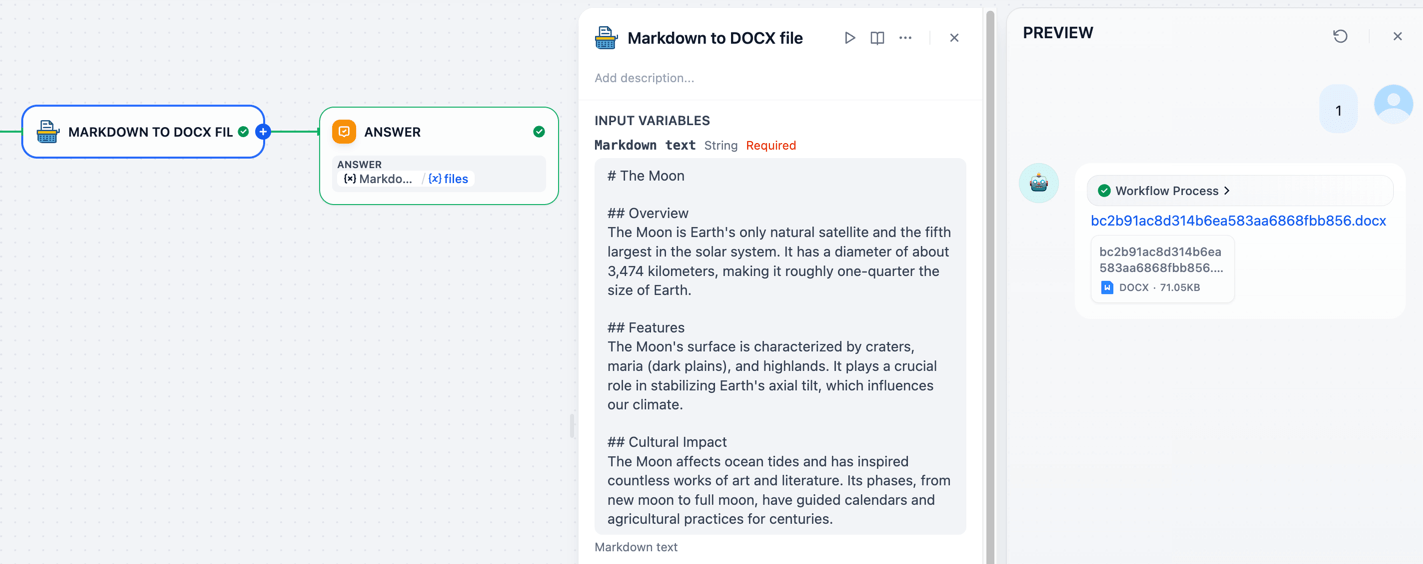
Simply input your Markdown text, select your desired output format, and click export. It's that easy!
🎨 Dify Tools Usages
📄 Markdown → DOCX
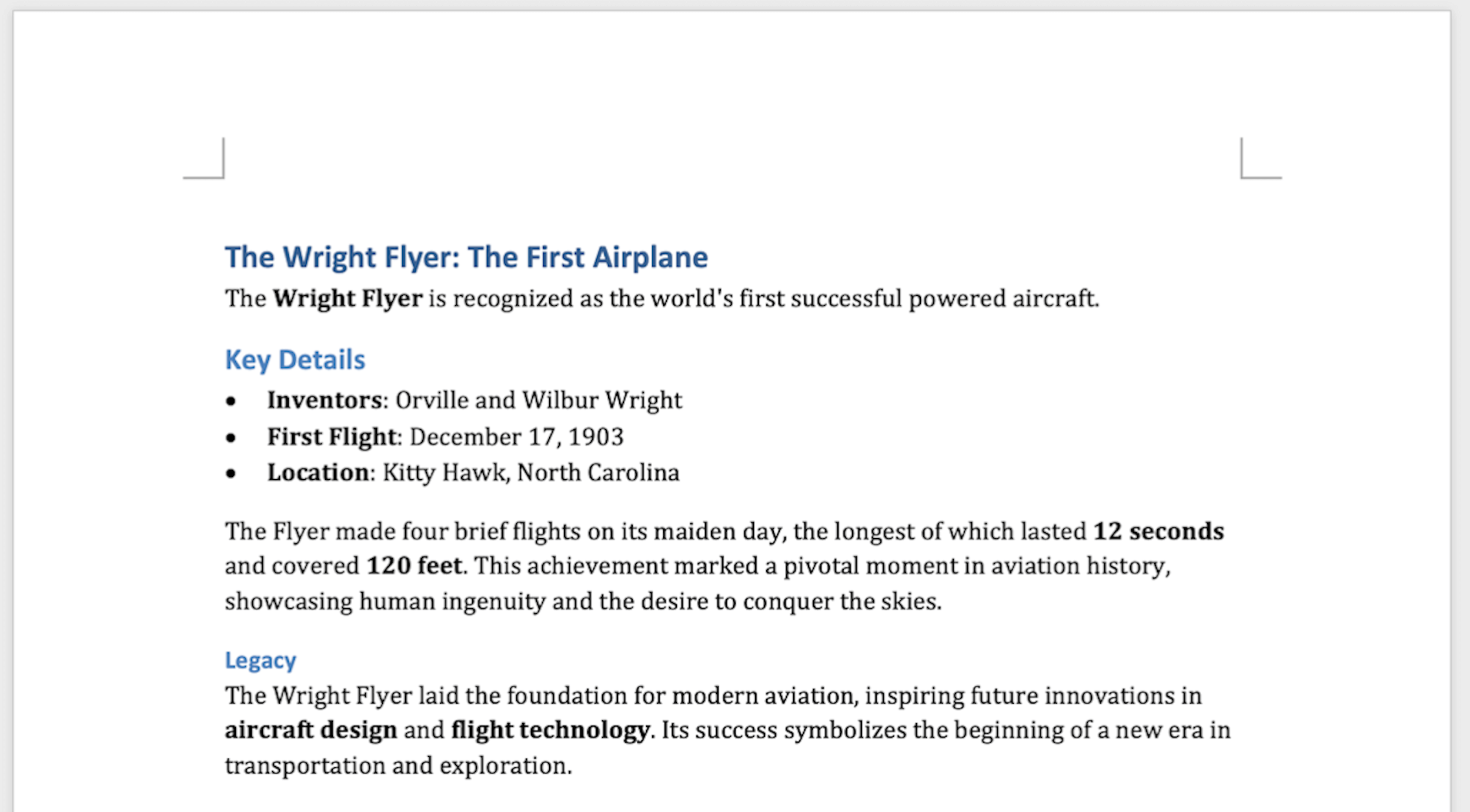
Create professional Word documents with beautiful formatting.
✨ Pro Tip: Custom Styling with Templates
The md_to_docx tool supports custom DOCX template files, giving you full control over your document's appearance.
What you can customize:
- Heading styles (fonts, sizes, colors)
- Paragraph formatting (spacing, indentation)
- Table styles and borders
- List styles and bullets
- And much more!
Check out the default docx template or create your own. Learn how at Customize or create new styles.
📊 Markdown → XLSX
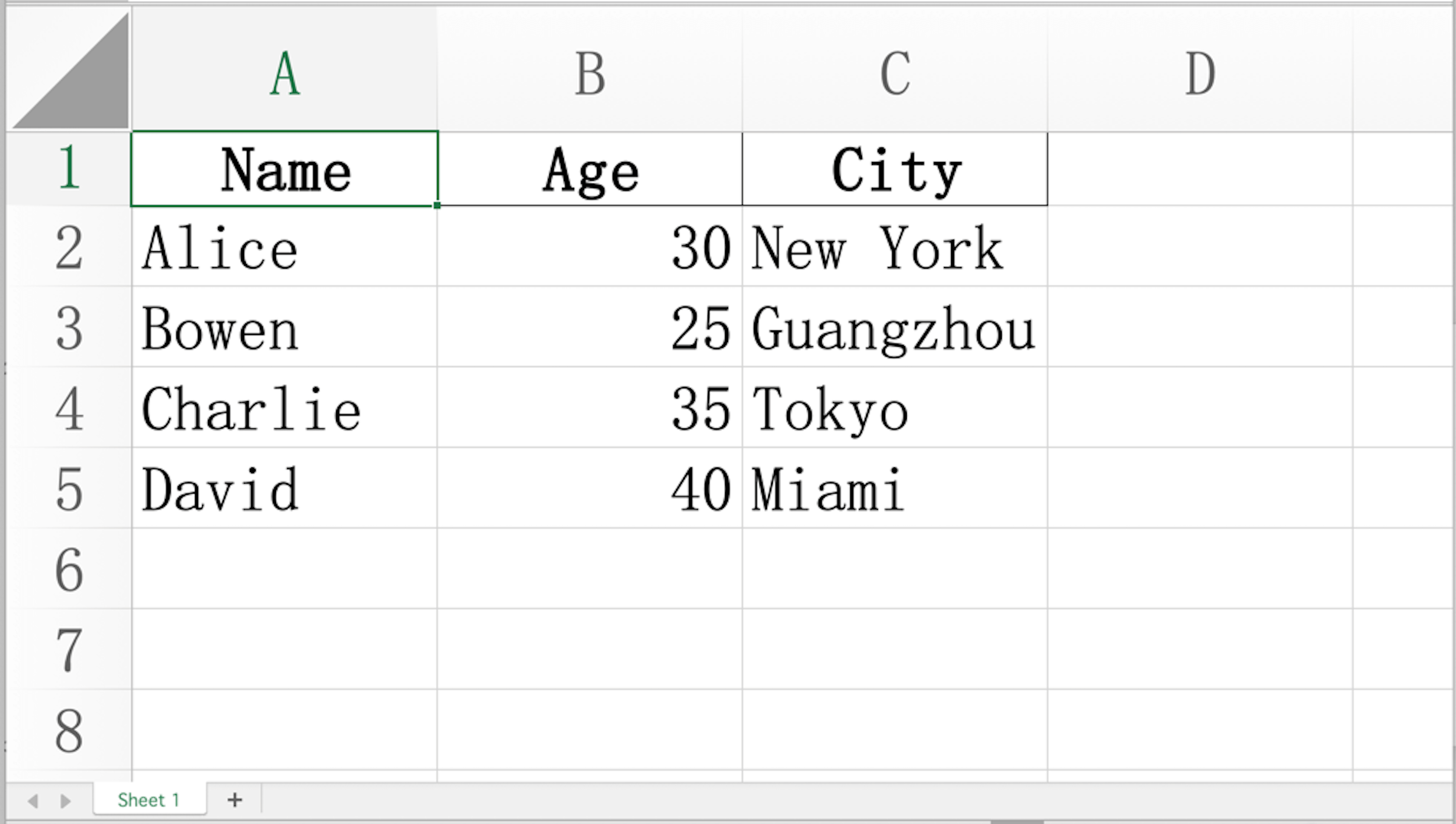
Convert your Markdown tables into polished Excel spreadsheets with auto-fitted columns and preserved data types.
Input:
| Name    | Age | City        |
|---------|-----|-------------|
| Alice   | 30  | New York    |
| Bowen   | 25  | Guangzhou   |
| Charlie | 35  | Tokyo       |
| David   | 40  | Miami       |
Output:
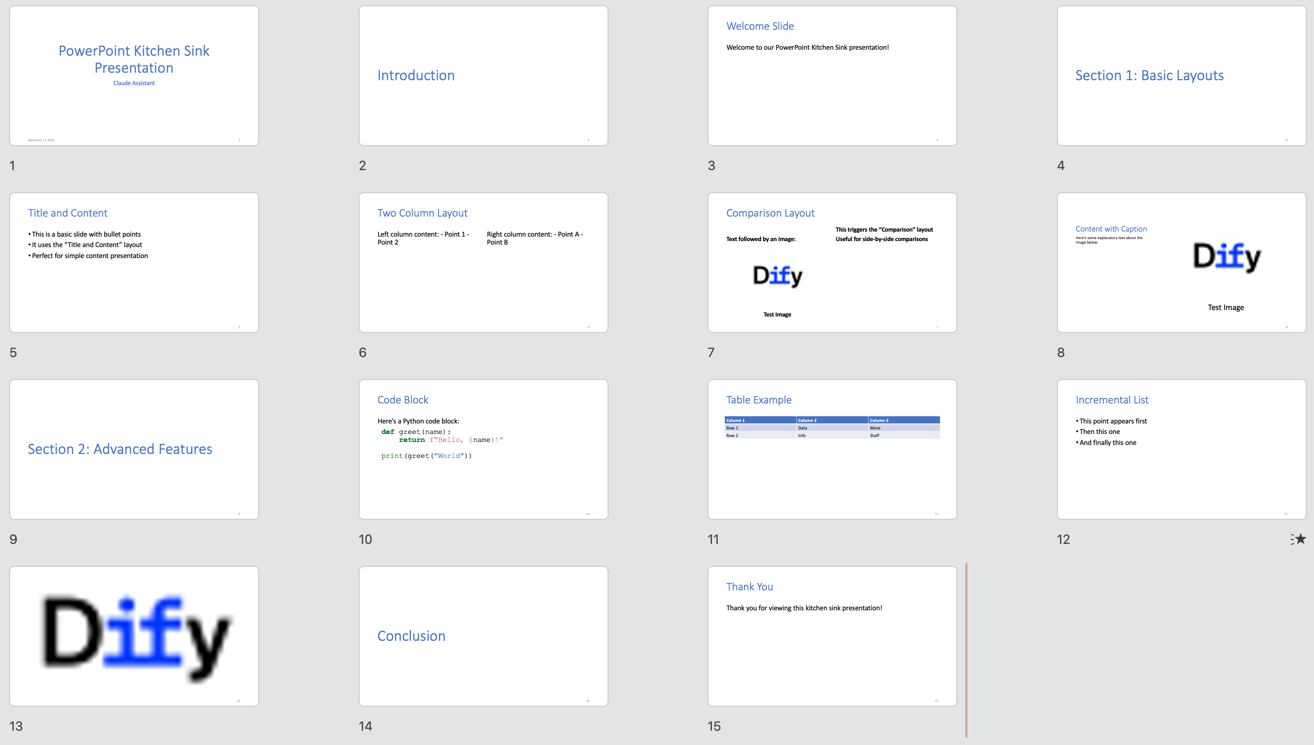
🎯 Markdown → PPTX
Turn your Markdown into stunning PowerPoint presentations automatically.
✨ Syntax Requirements
Supported Features:
-
✅ Title slides
-
✅ Column Layout
-
✅ Tables
-
✅ Hyperlinks
-
✅ And more!
🎨 Custom Templates:
Use custom PPTX templates with slide masters to match your brand's visual identity. Learn how. Get the default pptx template.
The input Markdown must follow the syntax and guidance in Pandoc Slide Shows.
Input Example:
---
title: Markdown Exporter
author: Bowen Liang
---
# Introduction
## Welcome Slide
Welcome to our Markdown Exporter!
::: notes
Remember to greet the audience warmly.
:::
---
# Section 1: Basic Layouts
## Title and Content
- This is a basic slide with bullet points
- It uses the "Title and Content" layout
- Perfect for simple content presentation
## Two Column Layout
::::: columns
::: column
Left column content:
- Point 1
- Point 2
:::
::: column
Right column content:
- Point A
- Point B
:::
:::::
## Comparison Layout
::::: columns
::: column
Text followed by an image:

:::
::: column
- This triggers the "Comparison" layout
- Useful for side-by-side comparisons
:::
:::::
## Content with Caption
Here's some explanatory text about the image below.

---
# Section 2: Advanced Features
## Code Block
Here's a Python code block:
```python
def greet(name):
return f"Hello, {name}!"
print(greet("World"))
```
## Table Example
| Column 1 | Column 2 | Column 3 |
|----------|----------|----------|
| Row 1 | Data | More |
| Row 2 | Info | Stuff |
## Incremental List
::: incremental
- This point appears first
- Then this one
- And finally this one
:::
## {background-image="https://avatars.githubusercontent.com/u/127165244?s=48&v=4"}
::: notes
This is a slide with a background image and speaker notes only.
The "Blank" layout will be used.
:::
# Conclusion
## Thank You
Thank you for viewing this kitchen sink presentation!
::: notes
Remember to thank the audience and invite questions.
:::
Output:
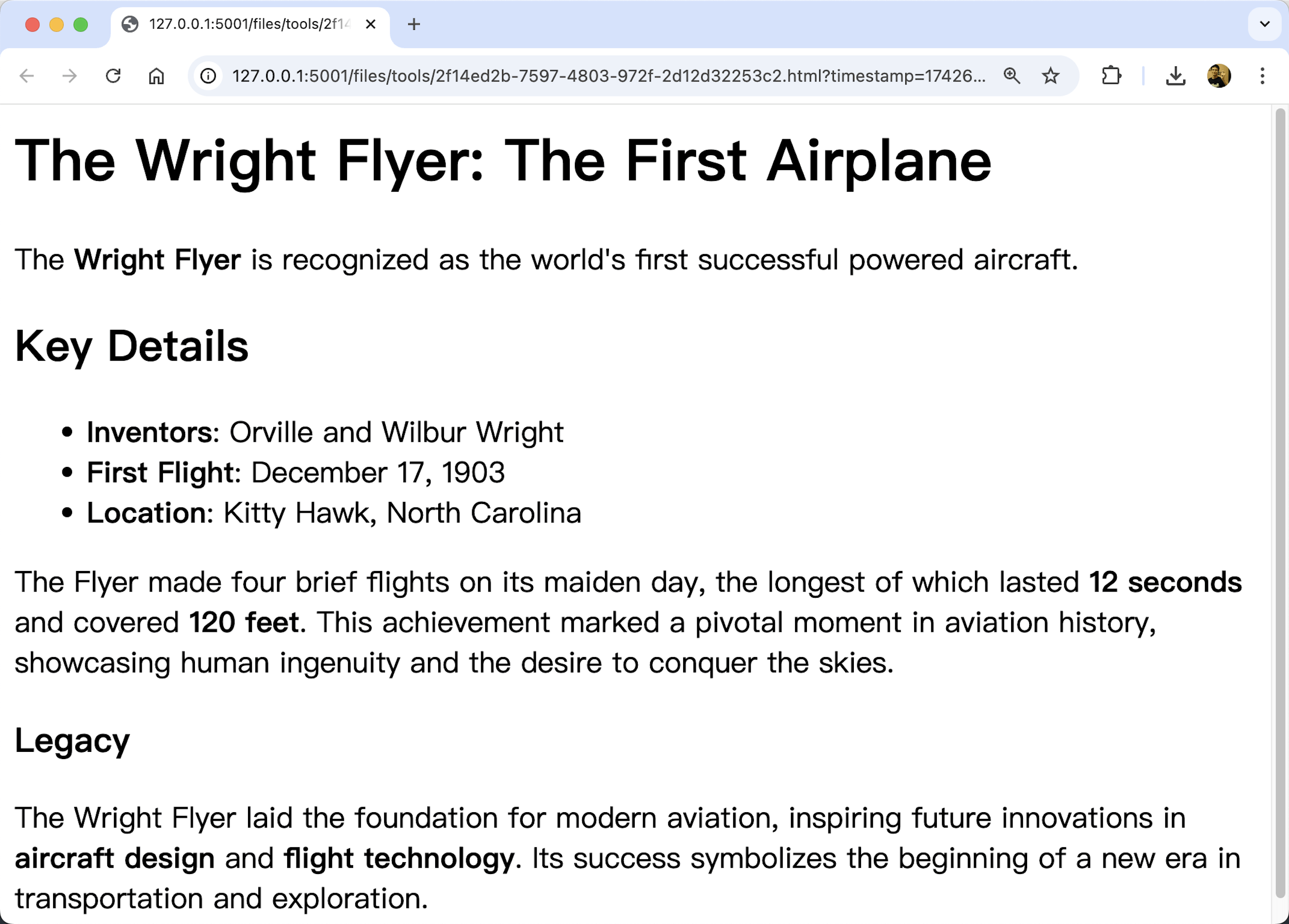
🌐 Markdown → HTML
Transform your Markdown into clean, semantic HTML perfect for web pages.
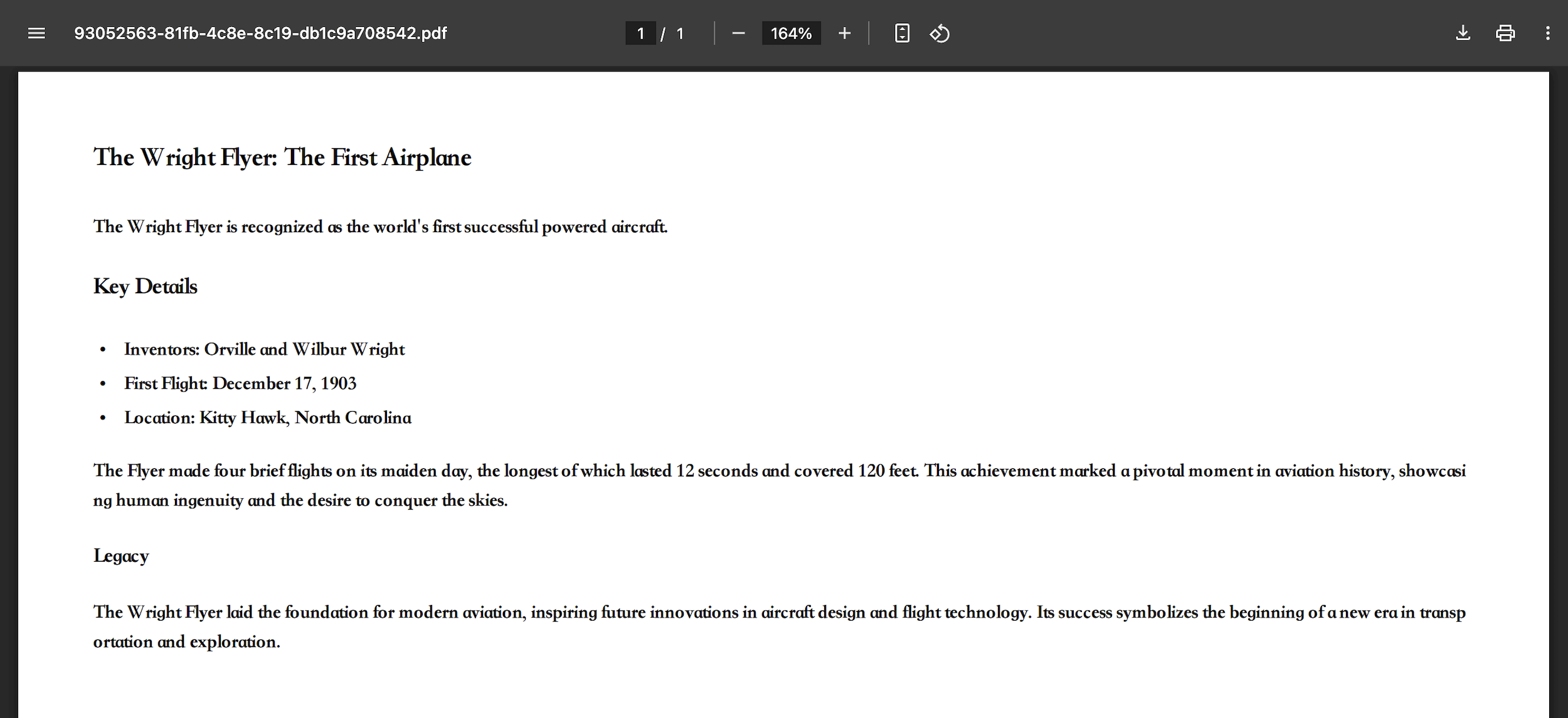
📑 Markdown → PDF
Generate professional PDF documents perfect for printing or sharing.
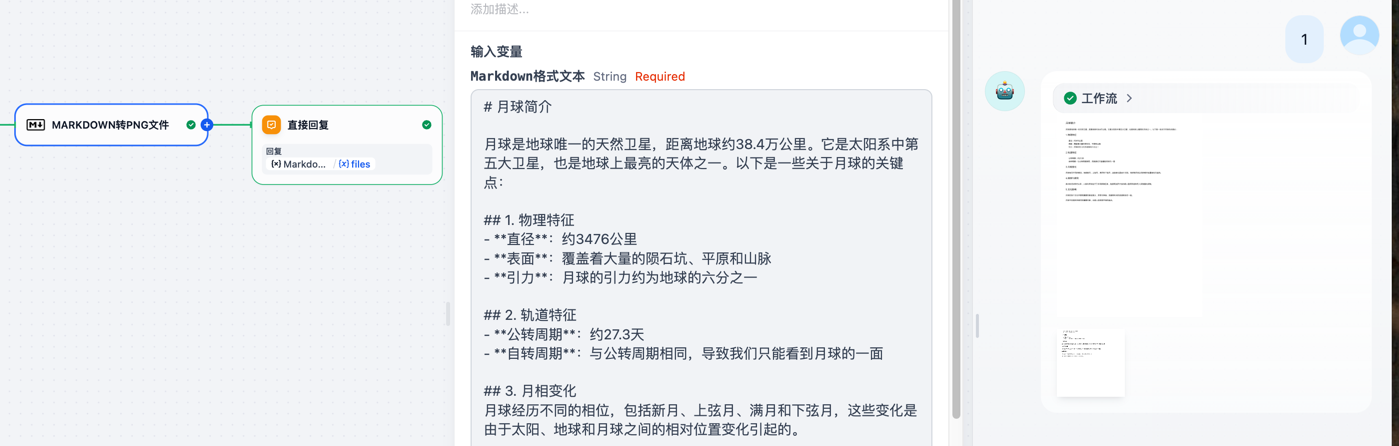
🖼️ Markdown → PNG
Convert your Markdown into beautiful PNG images. Great for:
- Social media posts
- Documentation screenshots
- Quick sharing in chat apps
🏷️ Markdown → Jupyter Notebook
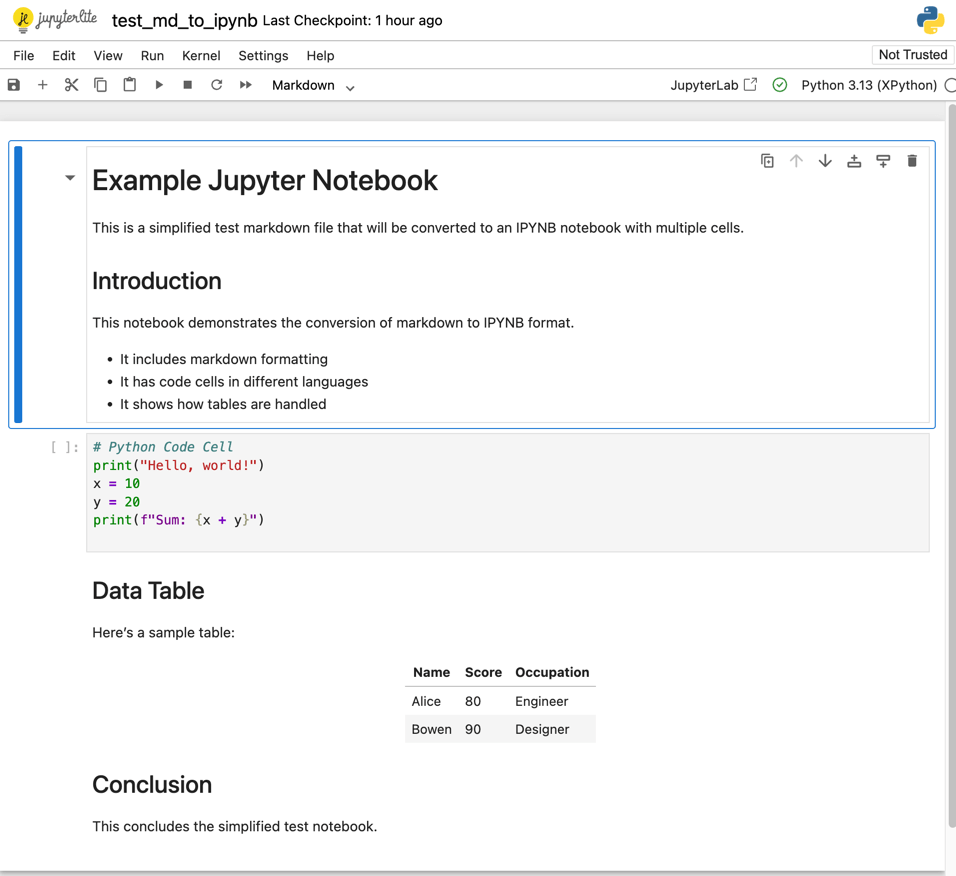
Transform your Markdown into Jupyter Notebook .ipynb format.
Input Example:
# Example Jupyter Notebook

This is a simplified test markdown file that will be converted to an IPYNB notebook with multiple cells.

## Introduction

This notebook demonstrates the conversion of markdown to IPYNB format.

- It includes markdown formatting
- It has code cells in different languages
- It shows how tables are handled

```python
# Python Code Cell
print("Hello, world!")
x = 10
y = 20
print(f"Sum: {x + y}")
```

## Data Table

Here's a sample table:

| Name  | Score | Occupation |
|-------|-------|------------|
| Alice | 80    | Engineer   |
| Bowen | 90    | Designer   |

## Conclusion

This concludes the simplified test notebook.
Output File:
💻 Markdown → Code Block Files
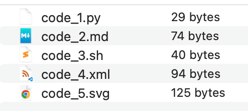
Effortlessly extract code blocks from your Markdown and save them as individual files, preserving syntax highlighting and formatting.
Supported Languages & File Extensions
| Language | File Extension | Language | File Extension |
|---|
| Python | .py | CSS | .css |
| JavaScript | .js | YAML | .yaml |
| HTML | .html | Ruby | .rb |
| Bash | .sh | Java | .java |
| JSON | .json | PHP | .php |
| XML | .xml | Markdown | .md |
| SVG | .svg | | |
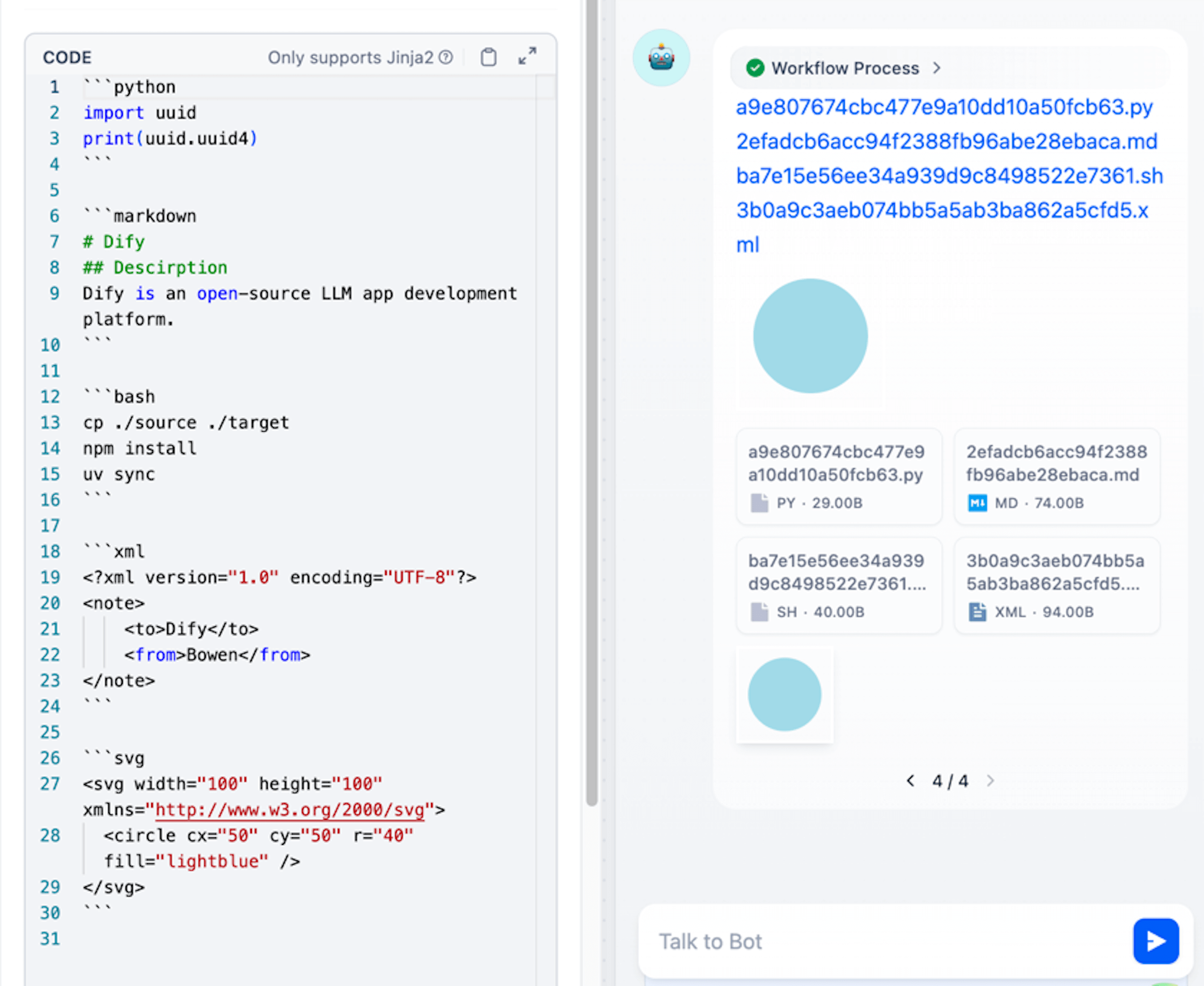
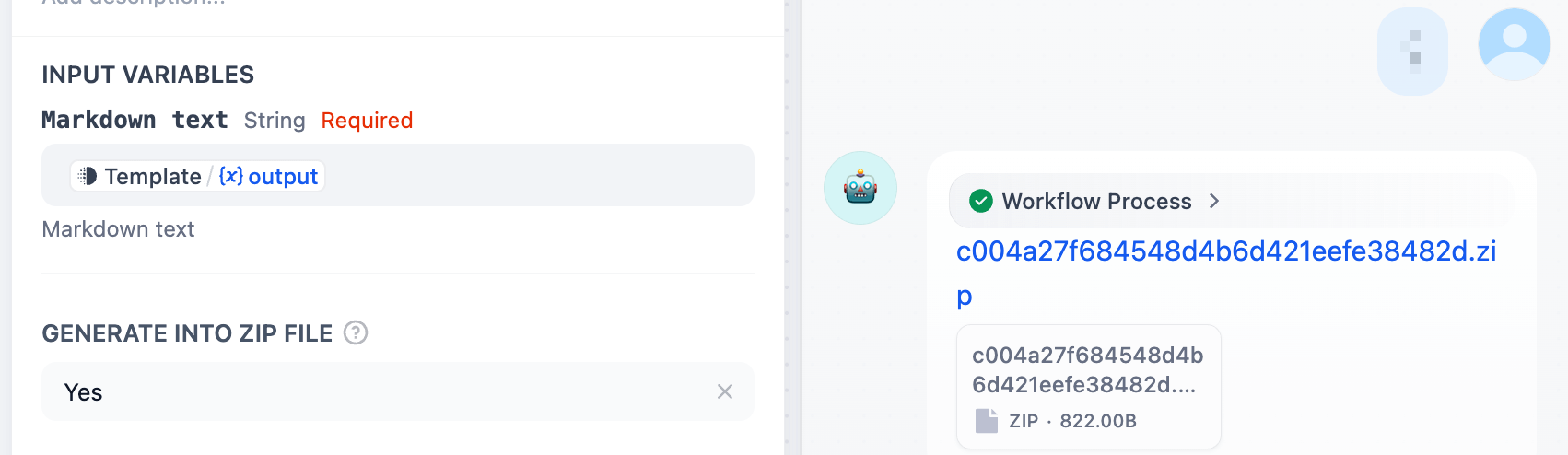
Pro Tip: Enable compression to bundle all extracted files into a single ZIP archive for easy sharing and organization!
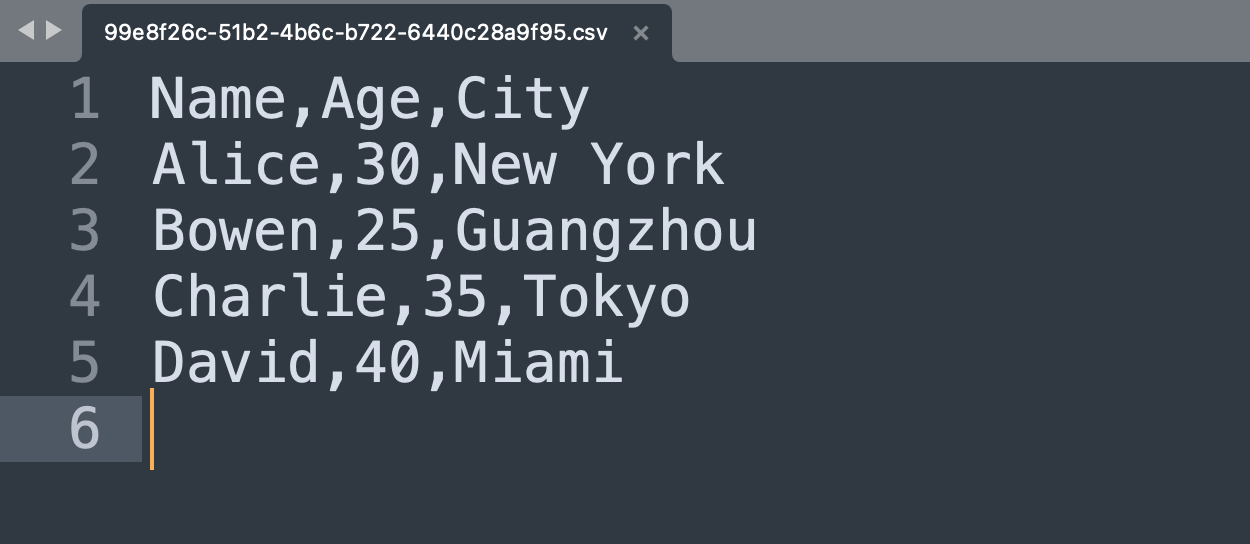
📋 Markdown → CSV
Export your Markdown tables to universal CSV format.
📦 Markdown → JSON / JSONL
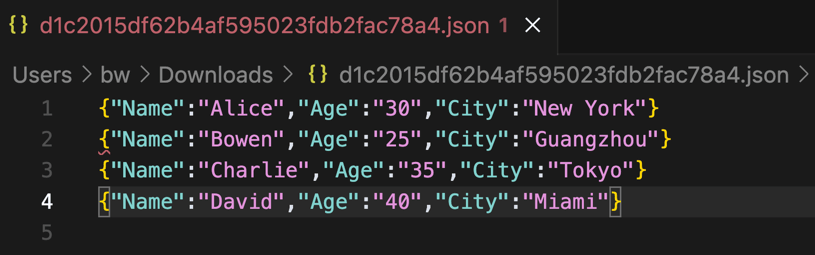
Convert your tables into structured data formats.
JSONL Style (default)
- One JSON object per line
- Perfect for streaming and logging
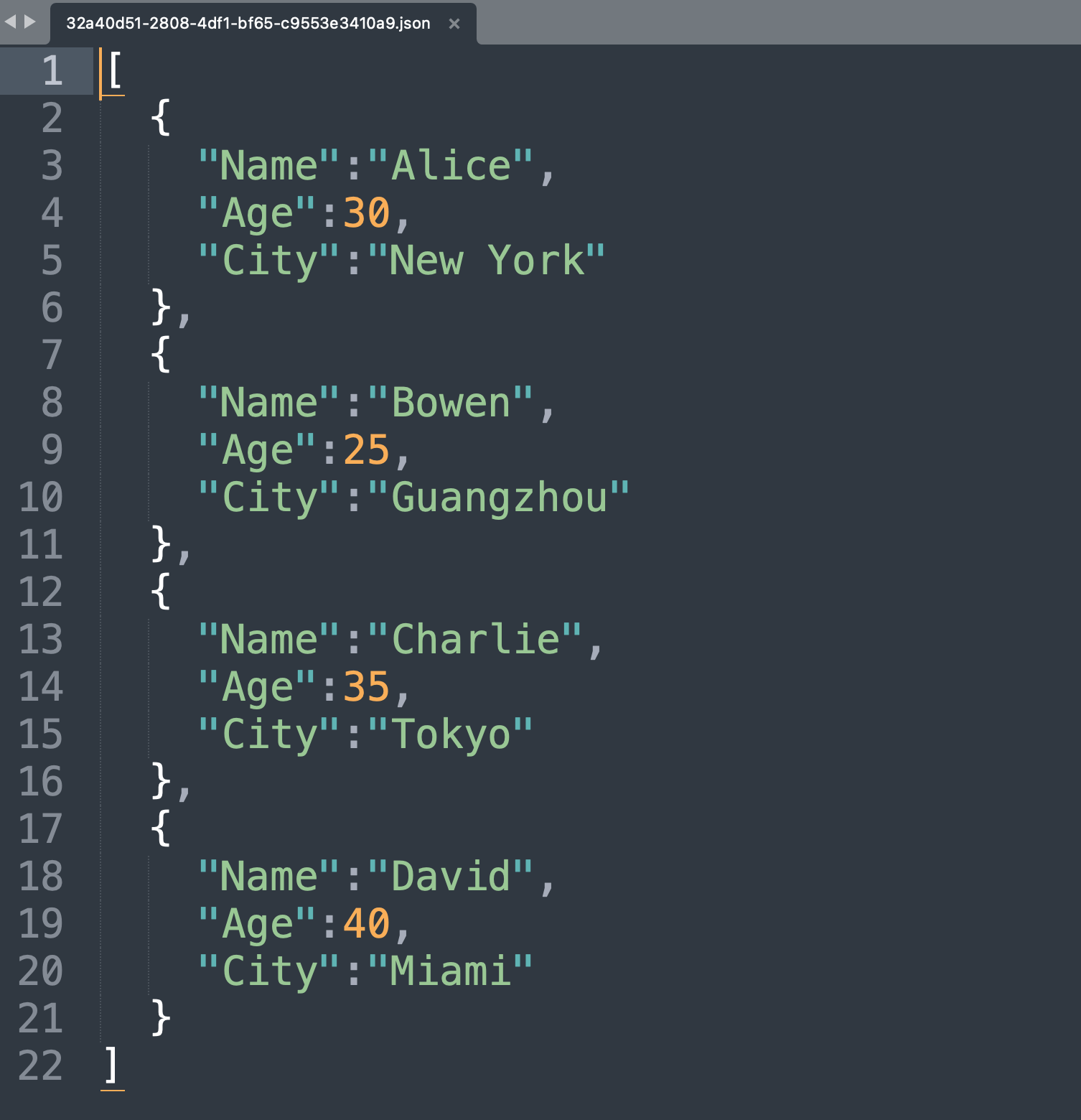
JSON Array Style
- All objects in a single array
- Ideal for API responses
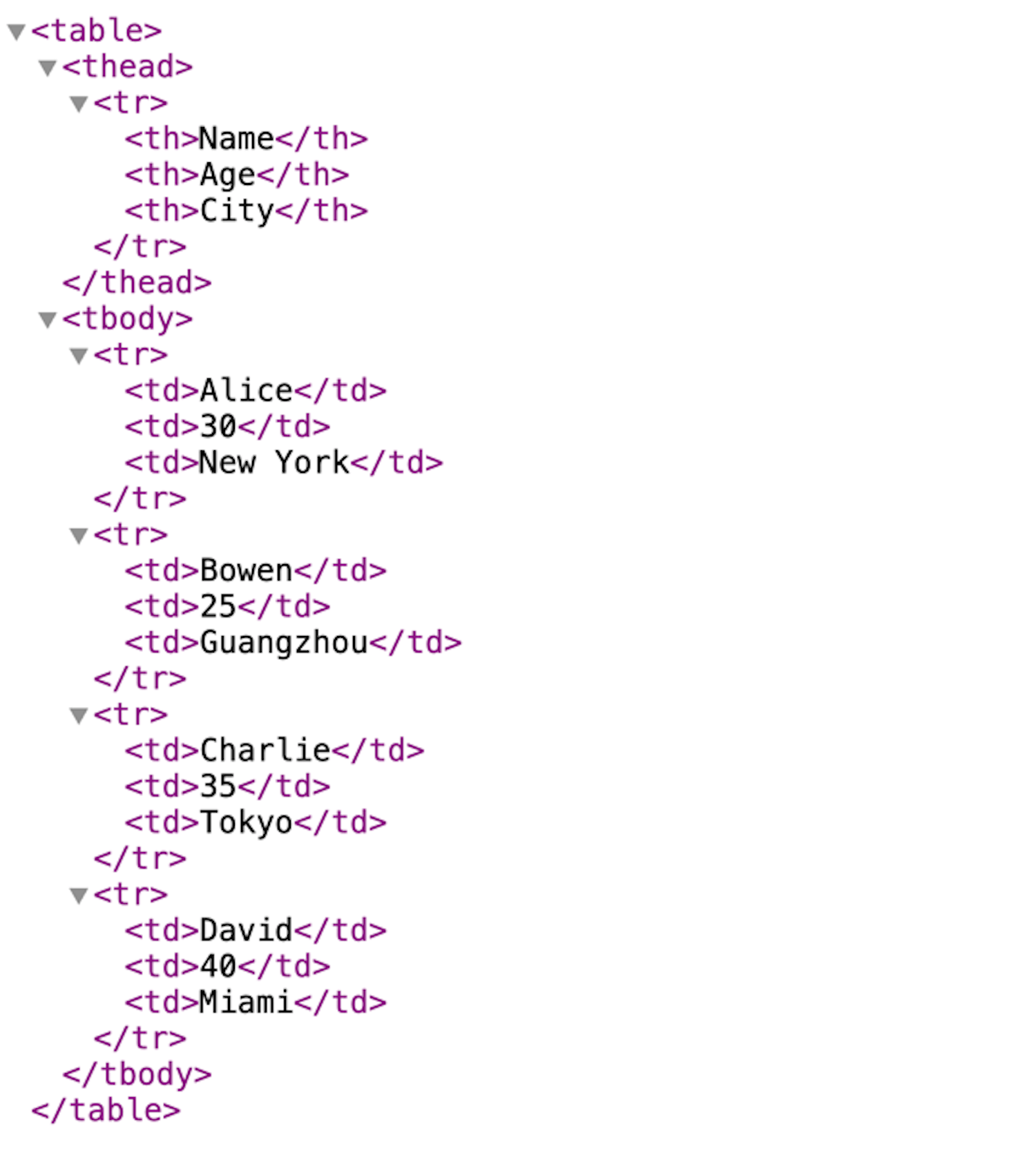
🏷️ Markdown → XML
Transform your data into XML format.
📝 Markdown → LaTeX
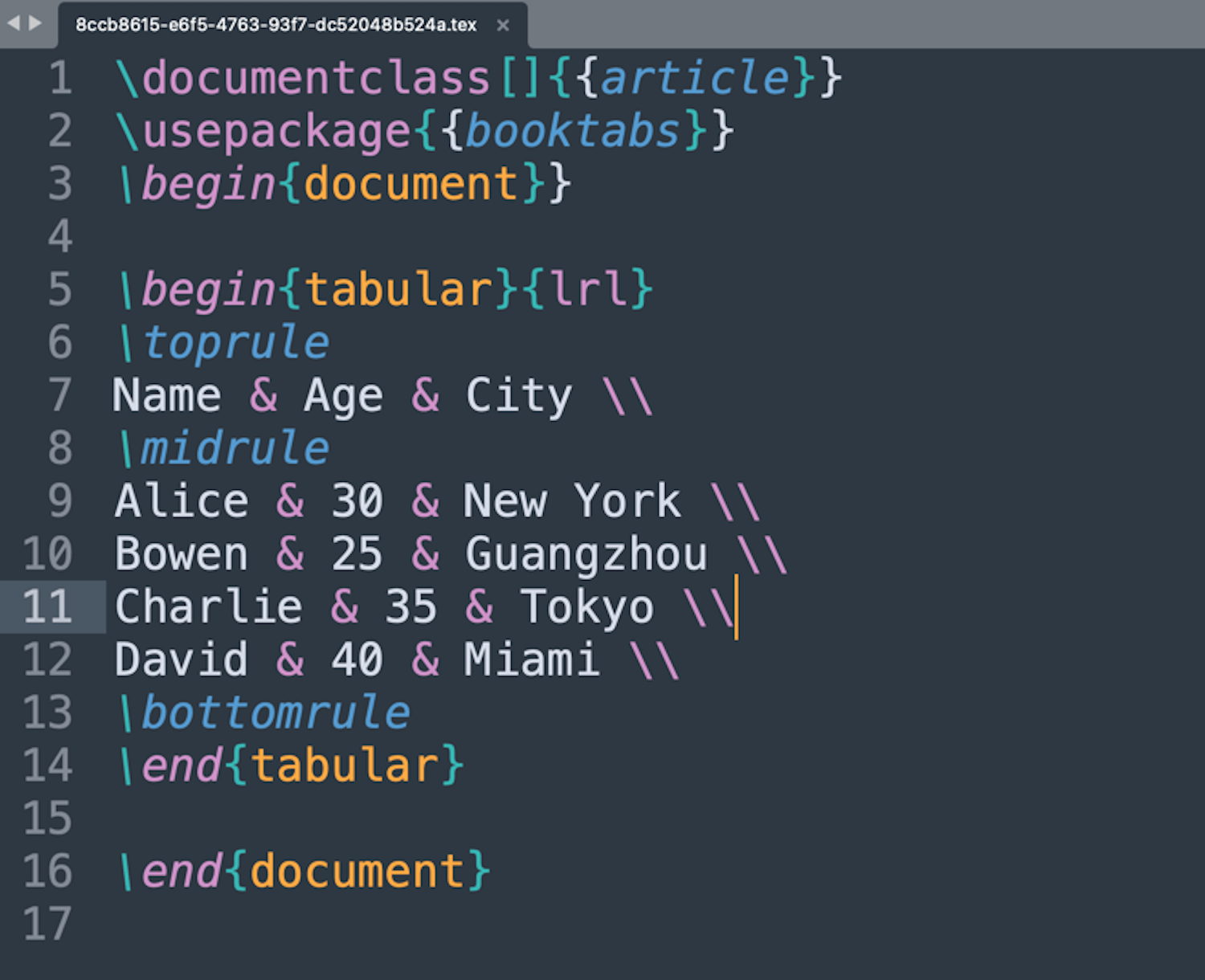
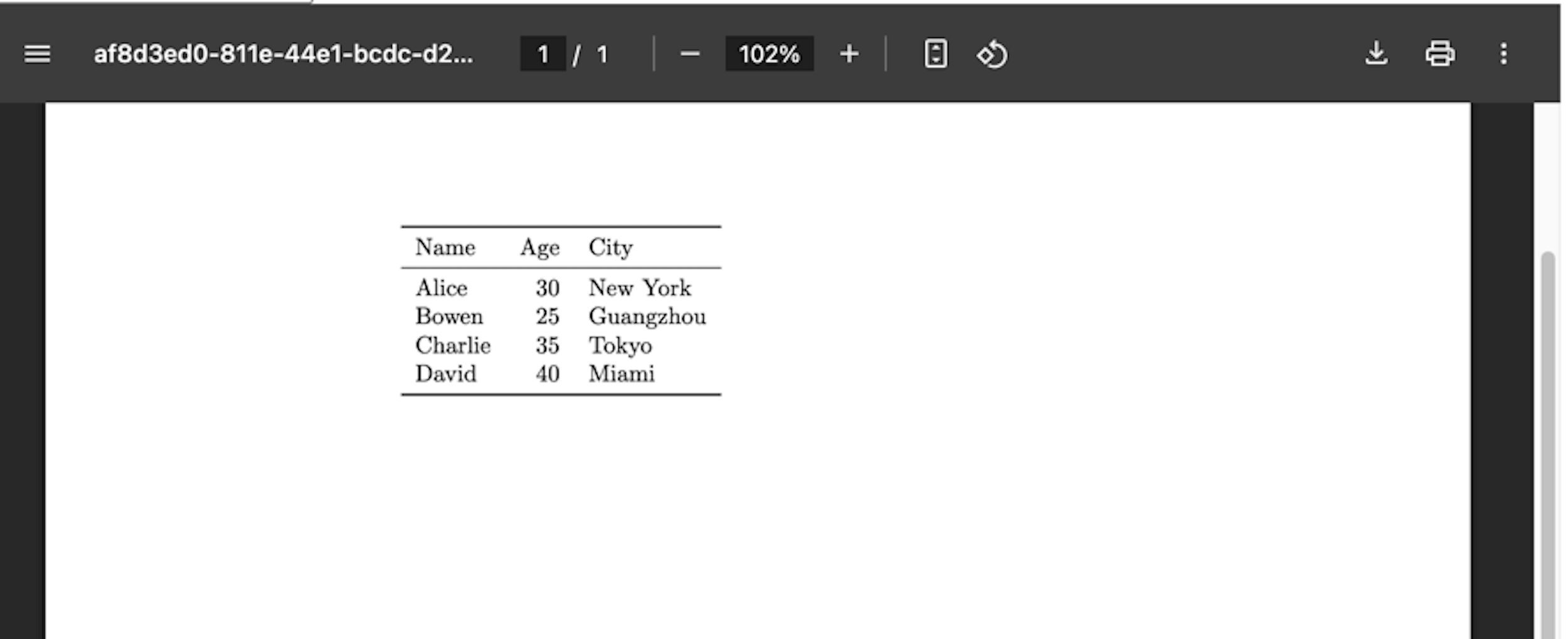
Generate LaTeX source code for academic and technical documents.
LaTeX Output:
Compiled PDF:
📝 Markdown → Markdown
Save your Markdown content as a .md file for future use.
Command Line Interface (CLI) Usage
Markdown Exporter provides a powerful command-line interface that allows you to access all its functionality directly from your terminal.
Installation
# with pip
pip install md-exporter

# with uv
uv tool install md-exporter
Basic Usage
Use the markdown-exporter command to access all the tools:
markdown-exporter <subcommand> <args> [options]
Tool Usage Guide
md_to_csv - Convert Markdown tables to CSV
markdown-exporter md_to_csv <input> <output> [options]
- Arguments:
input (Markdown file path), output (CSV file path)
- Options:
--strip-wrapper (Remove code block wrapper if present)
md_to_pdf - Convert Markdown to PDF
markdown-exporter md_to_pdf <input> <output> [options]
- Arguments:
input (Markdown file path), output (PDF file path)
- Options:
--strip-wrapper (Remove code block wrapper if present)
md_to_docx - Convert Markdown to DOCX
markdown-exporter md_to_docx <input> <output> [options]
- Arguments:
input (Markdown file path), output (DOCX file path)
- Options:
--template (Path to DOCX template file), --strip-wrapper (Remove code block wrapper if present)
md_to_xlsx - Convert Markdown tables to XLSX
markdown-exporter md_to_xlsx <input> <output> [options]
- Arguments:
input (Markdown file path), output (XLSX file path)
- Options:
--force-text (Convert cell values to text type), --strip-wrapper (Remove code block wrapper if present)
md_to_pptx - Convert Markdown to PPTX
markdown-exporter md_to_pptx <input> <output> [options]
- Arguments:
input (Markdown file path), output (PPTX file path)
- Options:
--template (Path to PPTX template file)
md_to_codeblock - Extract Codeblocks to Files
markdown-exporter md_to_codeblock <input> <output> [options]
- Arguments:
input (Markdown file path), output (Output directory or ZIP file path)
- Options:
--compress (Compress all code blocks into a ZIP file)
md_to_json - Convert Markdown Tables to JSON
markdown-exporter md_to_json <input> <output> [options]
- Arguments:
input (Markdown file path), output (JSON file path)
- Options:
--style (JSON output style: jsonl or json_array), --strip-wrapper (Remove code block wrapper if present)
md_to_xml - Convert Markdown to XML
markdown-exporter md_to_xml <input> <output> [options]
- Arguments:
input (Markdown file path), output (XML file path)
- Options:
--strip-wrapper (Remove code block wrapper if present)
md_to_latex - Convert Markdown Tables to LaTeX
markdown-exporter md_to_latex <input> <output> [options]
- Arguments:
input (Markdown file path), output (LaTeX file path)
- Options:
--strip-wrapper (Remove code block wrapper if present)
md_to_html - Convert Markdown to HTML
markdown-exporter md_to_html <input> <output> [options]
- Arguments:
input (Markdown file path), output (HTML file path)
- Options:
--strip-wrapper (Remove code block wrapper if present)
md_to_html_text - Convert Markdown to HTML Text
markdown-exporter md_to_html_text <input>
- Arguments:
input (Markdown file path)
md_to_png - Convert Markdown to PNG Images
markdown-exporter md_to_png <input> <output> [options]
- Arguments:
input (Markdown file path), output (PNG file or directory path)
- Options:
--compress (Compress all PNG images into a ZIP file), --strip-wrapper (Remove code block wrapper if present)
md_to_md - Convert Markdown to MD File
markdown-exporter md_to_md <input> <output>
- Arguments:
input (Markdown file path), output (MD file path)
md_to_ipynb - Convert Markdown to IPYNB
markdown-exporter md_to_ipynb <input> <output> [options]
- Arguments:
input (Markdown file path), output (IPYNB file path)
- Options:
--strip-wrapper (Remove code block wrapper if present)
Important Notes
- All commands only support file paths as input
- The package handles all dependency management automatically
- You can run the command from anywhere in your system, no need to navigate to the project directory
- Use
markdown-exporter <subcommand> -h for detailed help on each subcommand
📢 Releases
Releases are available at:
Changelog
-
3.6.9
- Reduced the packaged Dify plugin file size by 95% by removing the screenshot images for README docs.
-
3.6.7
- Fixed path error issue for docx and pptx template files in Python distribution package
-
3.6.6
- Refactor code structure to ensure Agent Skill, Dify plugin and CLI properly share the core file transformation logic
- Make project installable and usable on OpenClaw as Agent Skill 🦞
- Refactor Python packaging to make
markdown-exporter as standalone CLI tool with Python package md-exporter installed
- Remove
md_to_linked_image tool
-
3.6.0
- Improve conversion success rate in
md_to_docx, md_to_pptx, and md_to_ipynb tools by removing enforcement of spaces and blank lines in heading headers
- Speed up first call on pandoc by running the warm-up method
-
3.5.1
- Correctly handle code cells by pre-processing markdown input in
md_to_ipynb tool
-
3.5.0
- Introduce
md_to_ipynb tool for converting Markdown text to Jupyter Notebook (.ipynb) format
- The
md_to_ipynb tool automatically splits markdown content into separate notebook cells
- Update logo icon (for the very first time)
-
3.4.0
- [BREAKING CHANGE] Migrate
md_to_pptx tool to use pandoc for conversion for stable features and reduced dependency footprint
- The Markdown input for
md_to_pptx tool now must follow the markdown syntax and guidance in Pandoc slides
-
3.3.0
- Update
md_to_pptx from 6.1.1 to 6.2.1
- Remove
md_to_mermaid tool to reduce installation time and footprint by eliminating Node.js runtime dependency
-
3.2.0
- Introduce
md_to_mermaid tool for converting Mermaid diagram code blocks in Markdown to PNG images
- Refactor Agent Skill scripts and entry shell scripts
-
3.0.0
md_exporter is now ready for Agent Skills and runnable as standalone
- Add
SKILL.md for Agent Skills description
- Add
/scripts for code scripts of all tools as Agent Skills execution entry
- Extract core file transformation logic into
/scripts/lib shared by both Agent Skills scripts and Dify Plugin
- Add
pyproject.toml as Python project description and dependency management
- Add automated tests covering all usage of Claude Skills scripts entry points
- Bump
md2pptx from 6.1 to 6.1.1 for table caption bug fix
-
2.3.0
- Resolve XLSX generation issue by skipping irrelevant characters before first table in
md_to_xlsx tool
-
2.2.0
- Fix CI problems in GitHub Actions
-
2.1.0
- Fix remote image fetching in
md_to_pptx tool by updating md2pptx to 6.1
- Fix missing table border in
md_to_docx tool by updating default DOCX template file
- Intercept
run-python macro usage in md_to_pptx tool
-
2.0.0
- [BREAKING CHANGE] Migrate
md_to_docx tool to use pandoc for conversion
- Major improvements in
md_to_docx tool:
- Support custom styling using a template DOCX file, allowing font, font size, and color style customization for headings, paragraphs, etc.
- Optimize file size in generated DOCX files
- Better support for multi-language content
- Remove
md_to_rst and md_to_epub tools
- Add
force_text_value option in md_to_xlsx tool to control whether to force convert all cell values to text strings
-
1.12.0
- Fix optional PPTX template file handling in
md_to_pptx tool
- Fix error message with file path in command assembly in
md_to_pptx tool
- Bump
md2pptx to 6.0
-
1.10.2
- Bump
md2pptx from 5.4.4 to 5.4.5
- Bump
python-docx from 1.1 to 1.2.0
- Increase PDF generation capacity limit to 500MB
-
1.10.0
- Support JSONL output style in
md_to_json tool, using JSON Lines format with one object per line
- Change default output style of
md_to_json tool to JSONL
- Minor documentation updates in parameter descriptions
-
1.9.0
- Support custom sheet names in
md_to_xlsx tool using headings in Markdown text
- Force convert column types to string in
md_to_xlsx tool to prevent data precision loss and display issues in Microsoft Excel
- Autofit column width in
md_to_xlsx tool
-
1.8.0
- Resolve garbled character issues when opening CSV files containing non-ASCII characters (e.g., Chinese, Japanese, emoji characters) in Microsoft Excel
-
1.7.0
- Support custom PPTX template files in
md_to_pptx tool
- Support file generation from multiple tables in
md_to_csv, md_to_latex, and md_to_xlsx tools
-
1.6.0
- Introduce
md_to_html_text tool for converting Markdown text to HTML text
- Standardize fonts for headings and body paragraphs in DOCX files generated by
md_to_docx tool
-
1.5.0
- Improve PDF display for pure English markdown text input in
md_to_pdf tool by skipping font settings for CJK characters
- Introduce
md_to_epub tool for converting Markdown text to EPUB eBook files
- Support compressing all PNG files into a single zip file in
md_to_png tool
- Increase capacity limit for PDF files to 100MB in
md_to_pdf tool
- Remove explicit timeout configuration MAX_REQUEST_TIMEOUT
-
1.4.100
- Special version celebrating Dify's 100k GitHub stars milestone
- Add
md_to_png tool for converting Markdown text to PNG image files
-
1.3.0
-
1.2.0
- Support compressing images into a single zip file in
md_to_linked_image tool
-
1.1.0
- Enable line breaks normalization in all tools by default, replacing all occurrences of
\n with \n
- Remove
<think> tags of reasoning content in input Markdown text
- Fix missing custom output filename support in
md_to_csv, md_to_json, and md_to_latex tools
-
1.0.1
- Remove redundant URL-safe conversion in custom output filenames
-
1.0.0
- Support custom output filenames
-
0.5.0
- Introduce
md_to_linked_image tool for extracting image files from links in Markdown text
-
0.4.3
- Improve Chinese character display in text paragraphs in
md_to_docx tool by setting global font to Song if content contains Chinese characters
-
0.4.2
- Support Java, PHP, and Ruby file exporting in
md_to_codeblock tool
-
0.4.1
- Support YAML file exporting in
md_to_codeblock tool
-
0.4.0
- Support exporting Markdown codeblocks into a single zip file in
md_to_codeblock tool
-
0.3.0
- Fix library import error in
md_to_pptx tool when running on self-hosted Dify plugin-daemon service
-
0.2.0
- Introduce
md_to_codeblock tool for extracting code blocks in Markdown to Python, JSON, JS, BASH, SVG, HTML, XML, and MARKDOWN files
- Introduce
md_to_rst tool for converting Markdown to reStructuredText (.rst) format
-
0.1.x
- Introduce
md_to_pptx tool for converting Markdown to PowerPoint (.pptx) format
-
0.0.x
- Publish to Dify Marketplace
- Support exporting Markdown to DOCX, PPTX, XLSX, PDF, HTML, MD, CSV, JSON, XML, and LaTeX files
🤝 Contributing
Contributions are welcome! Please feel free to submit issues or pull requests on our GitHub repository.
Code Style
We use ruff to ensure code consistency. Run the following command to automatically fix code style issues:
uv run ruff check --fix --select UP .
Or use the provided script:
dev/reformat.sh
📜 License
This project is licensed under the Apache License 2.0.
🔒 Privacy
Privacy matters. See the Privacy Policy for more details. This plugin:
- Collects NO data
- Processes everything locally
- Sends NO information to third-party services
All file transformations happen entirely within the local environment.
🙏 Acknowledgments
This project stands on the shoulders of giants. We're grateful to these amazing open-source projects: