Skill Agent
Version: 0.2.32 · Type: Dify tool plugin · License: Apache-2.0
Author: liux297 · Repository: https://github.com/liux297/skill_agent
中文说明 · Operations cookbook · Privacy policy
Skill Agent turns folders that contain a SKILL.md into reusable capabilities for Dify workflows. A workflow can install and manage skills, let an LLM read only the instructions and resources it needs, run controlled commands, stream progress, and return text or generated files.
What the plugin provides
| Tool | Purpose | Typical workflow branch |
|---|
| Skill Manager | List, add, delete, and download skills in one Skill Space | Administration or update branch |
| Skill Agent | Select a skill, follow its SKILL.md, call controlled runtime tools, and produce the final answer/files | Normal user-query branch |
Each workflow chooses a Skill Space. Workflows with different space names use isolated skill libraries, history keys, and temporary sessions. An optional shared space can supply read-only fallback skills.
Example workflow used in this guide
The screenshots below come from a Dify chatflow named Business Assistant – Skill Edition. It routes management commands away from ordinary questions and keeps one business skill in the isolated flow-assistant-skill space.
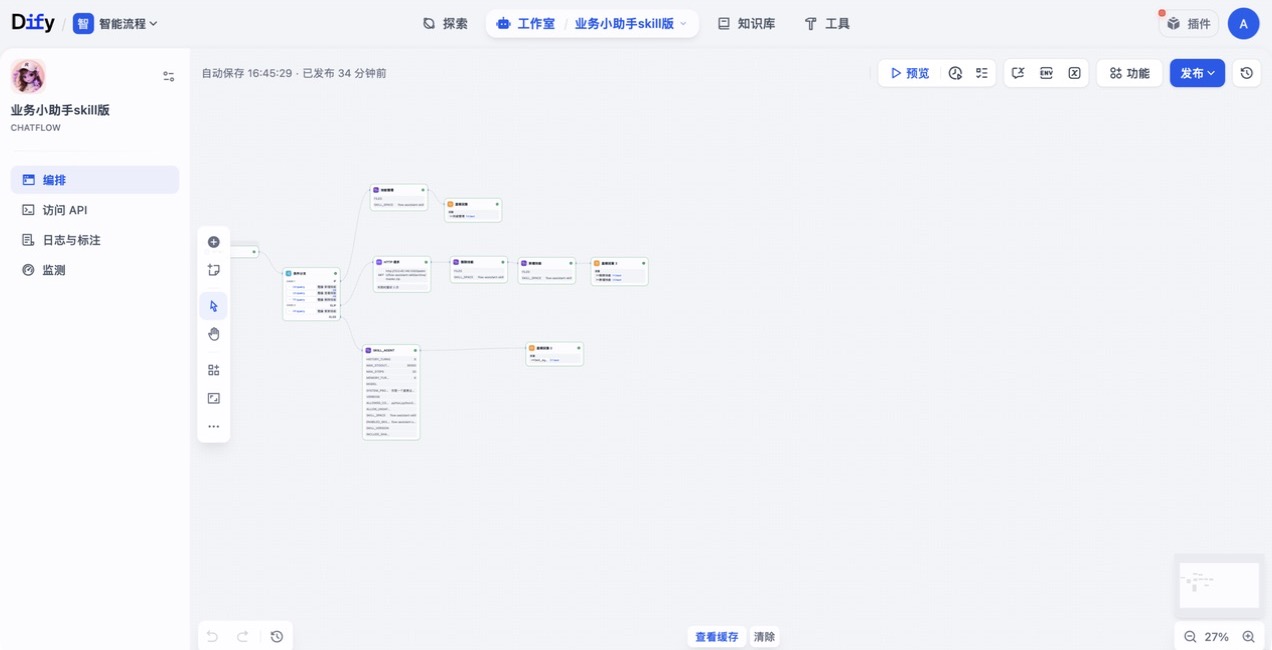
The routing pattern is:
| Condition | Nodes | Result |
|---|
Query contains 查看技能, 新增技能, 删除技能, or 下载技能 | Skill Manager → Direct Reply | Deterministic skill administration |
Query contains 更新技能 | Download ZIP → delete old skill → add new skill → Direct Reply | Controlled skill deployment from Git/Release archive |
| Any other query | Skill Agent → Direct Reply | Business answer and optional generated files |
This separation is recommended: end-user questions stay in Skill Agent, while installation and deletion remain explicit workflow branches.
1. Install the plugin
Install Skill Agent from the Dify Marketplace or upload the .difypkg file on the Dify plugin page.
For self-hosted Dify, make sure URLs generated for uploaded files are reachable from the plugin daemon. If file upload or download fails, check the Dify public/base file URL and the network path between Dify and the plugin runtime.
2. Prepare the workflow inputs
Create these start variables when needed:
| Variable | Type | Use |
|---|
query | String | User question or a Skill Manager command |
files | Array[File] | Skill ZIP upload or files for Skill Agent to process |
current_user or another identity field | String | Optional runtime identity passed through custom_variables |
Connect query and files to the corresponding plugin inputs. The example workflow maps its user identity into custom_variables as JSON.
3. Configure Skill Manager
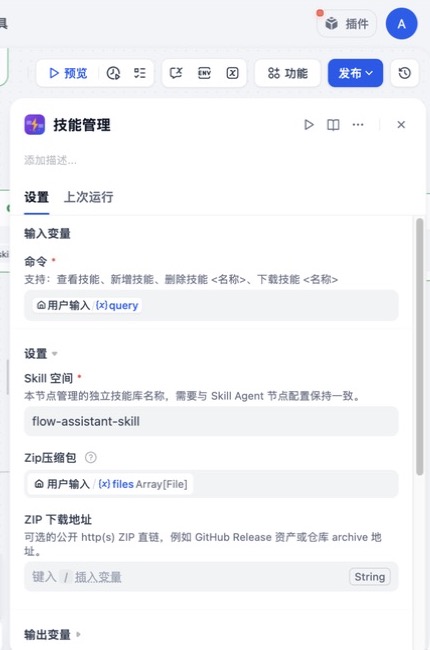
Parameters
| Parameter | Required | How to use it |
|---|
command | Yes | Map the user query or provide a fixed command such as 查看技能 |
skill_space | Yes | Library to manage; use the same value on Skill Agent |
files | No | ZIP files used by 新增技能; uploaded files take precedence over archive_url |
archive_url | No | Public credential-free http(s) ZIP URL used by 新增技能 when no file is uploaded |
The example uses flow-assistant-skill for skill_space.
Commands
| Command | Example | Behavior |
|---|
| List | 查看技能 | Lists stable skill folder names in the selected space |
| Add | 新增技能 | Installs one or more skill folders from uploaded ZIP files or archive_url |
| Delete | 删除技能 flow-assistant-skill | Deletes the named skill from the selected space |
| Download | 下载技能 flow-assistant-skill | Returns the named skill as a ZIP file |
存入技能 and 保存技能 are accepted aliases for add. 查看 and 查看 技能 are accepted aliases for list.
Important behavior:
- Add does not overwrite an existing folder. Delete the old skill first or use a separate versioned Skill Space.
- Delete and download use the folder name, not a numeric index.
- ZIP extraction rejects absolute paths, path traversal, excessive file counts, and excessive uncompressed size.
archive_url must be a public http(s) URL without embedded credentials and is limited by the plugin upload-size guard.
4. Create a valid skill package
A typical ZIP contains one top-level skill folder:
flow-assistant-skill/
├── SKILL.md
├── Reference/
│   └── process-notes.md
└── Scripts/
    └── query_project.py
SKILL.md is the entry point. Use YAML frontmatter when you need metadata or a pinned version:
---
name: flow-assistant-skill
description: Answers workflow, project, task, and business-order questions.
version: 2.7.0
---

# Instructions

1. Read only the reference required for the question.
2. Run `python Scripts/query_project.py ...` for live project data.
3. Return a concise table and never invent missing values.
Use relative paths in skill instructions. Generated deliverables should be written to the temporary session directory and explicitly marked/exported as final files.
5. Configure Skill Agent
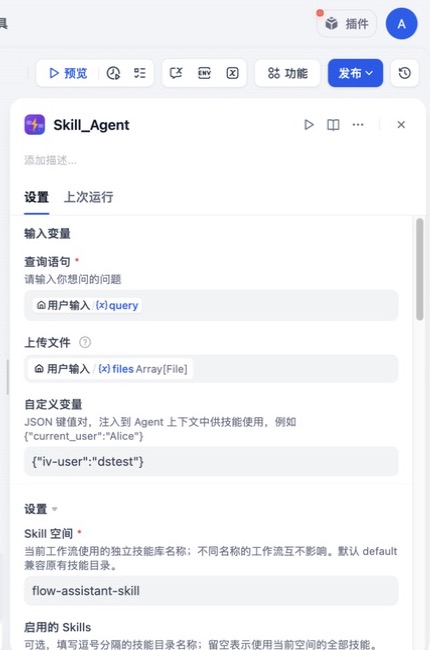
All parameters
| Parameter | Required | Default | How to use it |
|---|
query | Yes | — | User question or task |
files | No | — | Files the selected skill may inspect or transform |
custom_variables | No | — | JSON object injected into the agent context, skill templates, and subprocess environment |
skill_space | Yes | default | Isolated library for this workflow |
enabled_skills | No | all | Comma-separated skill-folder allow-list |
skill_version | No | — | Expected version for exactly one enabled skill; mismatch stops execution |
include_shared_skills | Yes | false | Adds the shared space as read-only fallback; private same-name skills win |
model | Yes | — | Dify chat model used for planning and tool calls |
max_steps | Yes | 15 | Maximum reasoning/tool rounds in one invocation |
memory_turns | Yes | 12 | Recent messages kept inside the current invocation |
system_prompt | No | built-in | Short domain constraints that override/extend default agent behavior |
verbose | Yes | false | Shows commands, paths, arguments, stdout, and errors for debugging |
history_turns | Yes | 3 | Previous workflow runs injected as raw conversation; 0 disables it |
max_stdout_chars | Yes | 30000 | Per-command output cap before JSON compression or truncation |
allowed_commands | No | safe defaults | Comma-separated executables the runtime may use |
allow_unsafe_commands | Yes | false | Enables explicitly listed shells, package managers, Git, and network clients |
Recommended configuration for the example
| Setting | Example value | Reason |
|---|
skill_space | flow-assistant-skill | Isolates this workflow's business skill |
enabled_skills | flow-assistant-skill | Prevents accidental routing to unrelated skills |
include_shared_skills | false | Keeps production behavior deterministic |
max_steps | 30 | Allows multi-API business queries |
memory_turns | 6 | Keeps the active run compact |
history_turns | 8 | Preserves recent conversation continuity |
max_stdout_chars | 30000 | Suitable for normal structured API output |
verbose | false | Keeps end-user replies concise |
allow_unsafe_commands | false unless required | Safer default for production |
Custom variables and current user
Pass a JSON object, for example:
{"iv-user":"${current_user}"}
The values are available in three forms:
- Agent session context through
get_session_context()
${iv-user} replacement inside SKILL.md and other read skill text- Sanitized subprocess environment variables, for example
IV_USER
If the workflow already supplies the current user, map it directly. Do not ask the end user to identify themselves again unless the value is genuinely absent.
Skill selection and version pinning
- Empty
enabled_skills exposes every skill in the selected private space.
- A comma-separated allow-list restricts discovery and execution to those folder names.
skill_version is fail-closed and requires exactly one item in enabled_skills.- Versions may be declared in YAML frontmatter or as an explicit version line in
SKILL.md.
- With
include_shared_skills=true, private skills are checked first; shared is fallback only.
Memory settings
memory_turns and history_turns solve different problems:
memory_turns controls the working window while one Skill Agent call is running.history_turns restores raw user/assistant turns from previous calls in the same Skill Space.
Use a smaller history for independent tasks and a larger history for conversational assistants. History and resume keys are scoped by Skill Space.
Command security
Normal mode recognizes a small safe set such as python, python3, node, pandoc, soffice, and pdftoppm. The allowed_commands field can narrow this set; names outside the plugin's recognized safe/unsafe sets are ignored.
Shells, package managers, Git, and network clients remain blocked unless all of the following are true:
- The skill is trusted and the deployment is self-hosted.
allow_unsafe_commands is enabled.- The executable is explicitly present in
allowed_commands.
Do not enable unsafe mode for skills uploaded by untrusted users.
6. Understand the runtime capabilities
The model does not receive unrestricted filesystem or shell access. It can call a defined runtime tool set:
| Capability | Runtime operations |
|---|
| Discover skills | List installed skills and read SKILL.md metadata |
| Inspect a skill | List files and read relative text files |
| Execute a skill | Run an allowed command inside the selected skill directory |
| Manage session files | Write, read, list, and transform files inside the temporary session |
| Deliver files | Mark/export a temporary file and return it through the plugin files output |
| Manage installed skills | Install, list, uninstall, or update a skill from a session ZIP/directory |
| Read context | Obtain Skill Space, enabled skills, upload paths, and custom variables |
Progress is streamed while tools run. With verbose=false, each step is a short user-facing sentence; with verbose=true, detailed technical diagnostics are also shown.
7. Return the result from Dify
Connect both Skill Agent outputs to the final answer node:
text: final answer and progress markupfiles: generated deliverables such as Markdown, PDF, images, or spreadsheets
For normal chat, return text. If the skill may generate artifacts, also map files so users can download them.
8. Automate skill updates
The example workflow uses a dedicated 更新技能 branch:
- Download the new repository or Release ZIP.
- Run Skill Manager with
删除技能 <name> in the target Skill Space.
- Run Skill Manager with
新增技能 and pass the downloaded file.
- Return both operation results.
For a simpler workflow, skip the HTTP node and put a public ZIP URL in Skill Manager's archive_url; it is used when files is empty.
Keep the same skill_space on every manager and agent node in the branch. Test the new skill in a staging space before replacing a production skill.
9. System prompt guidance
Keep the node-level system prompt short. Put detailed procedures, API contracts, examples, and output rules in the skill itself.
A useful system prompt contains only domain-wide constraints, for example:
Answer business-process and live-data questions with the installed skill.
Always call the relevant API for project, task, approval, or workflow data.
Never invent unavailable values. Prefer concise tables or lists.
10. Troubleshooting
| Symptom | Check |
|---|
| ZIP cannot be installed | The ZIP is reachable, within size limits, and contains a skill folder with SKILL.md |
| Skill already exists | Delete the same folder name first or install into another Skill Space |
| Skill is not discovered | skill_space, enabled_skills, and folder name match exactly |
| Version validation stops | One enabled skill is configured and its declared version matches skill_version |
| Uploaded files cannot be read | Dify's generated file URL is reachable from the plugin daemon |
| Command is rejected | The executable is recognized, listed in allowed_commands, and unsafe mode is enabled when required |
| Output is too large | Lower max_stdout_chars or make the skill return filtered/structured data |
| Replies lose context | Increase history_turns; keep the same Skill Space across calls |
| End-user output is too technical | Set verbose=false and move detailed rules from the system prompt into SKILL.md |
Release 0.2.32
- Rewrote the complete operation guide around a real Dify workflow.
- Added public ZIP URL installation to Skill Manager for automated updates.
- Documented every public parameter, management command, security switch, and output.
- Replaced legacy screenshots with current Skill Space workflow screenshots.
Contact