中文 | English
Project source code address:
Qwen Text2Image & Image2Image Dify Plugin
📖 Project Overview
This is a comprehensive Dify plugin based on ModelScope Qwen-Image models that supports both text-to-image generation and image-to-image editing. Generate high-quality images from text descriptions or edit existing images with text prompts. The plugin uses asynchronous task processing to ensure stable and reliable image generation.
✨ Key Features
- 🎨 High-Quality Image Generation: Supports advanced Qwen-Image-2512 and other models
- ✏️ Image Editing: Edit existing images with text prompts using Qwen-Image-Edit-2511, Qwen-Image-Edit-2509 and other models
- 📐 Custom Image Size Support: Flexible image dimensions with custom size configuration (WxH format)
- 🖼️ Automatic Size Detection: Image2Image tool automatically detects input image dimensions as default
- ⚡ Asynchronous Processing: Uses task submission + polling async mode to avoid timeouts
- 🔄 Real-time Feedback: Provides detailed generation progress and status information
- 🛡️ Error Handling: Comprehensive exception handling with user-friendly error messages
- 🌐 Bilingual Support: Supports both English and Chinese interface and messages
🏗️ Project Architecture
qwen_text2image_plugin/
├── manifest.yaml              # Plugin manifest file
├── main.py                   # Plugin entry point
├── requirements.txt          # Python dependencies
├── .env.example             # Environment variables example
├── README.md                # Project documentation
├── icon.svg                 # Plugin icon
├── provider/                # Service provider configuration
│   ├── __init__.py
│   ├── modelscope.yaml      # ModelScope provider config
│   └── modelscope_provider.py
└── tools/                   # Tool implementation
    ├── __init__.py
    ├── text2image.yaml      # Text-to-image tool config
    └── text2image.py        # Text-to-image tool implementation
🚀 Quick Start
1. Get ModelScope API Key
- Visit ModelScope Official Website
- Register and login to your account
- Go to My Access Token page
- Create a new API Key (format:
ms-xxxxxx)
2. Install Dependencies
pip install -r requirements.txt
3. Configure Environment
Copy .env.example to .env and configure the parameters:
cp .env.example .env
4. Install Plugin in Dify
- Upload the plugin folder to Dify plugin directory
- Enable the plugin in Dify management interface
- Configure ModelScope API Key
🔧 Usage
Basic Usage
-
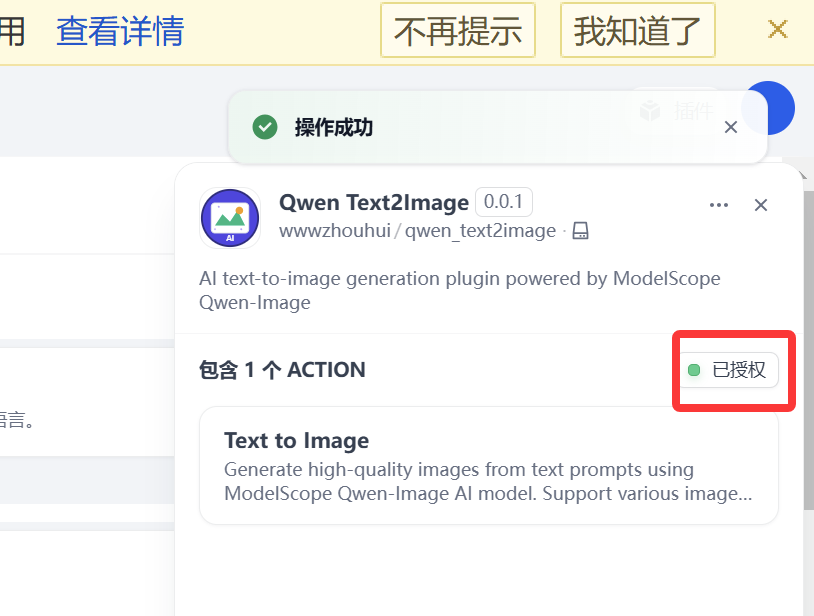
Add "Qwen Text2Image" tool in Dify workflow
-
Configure ModelScope API Key

-
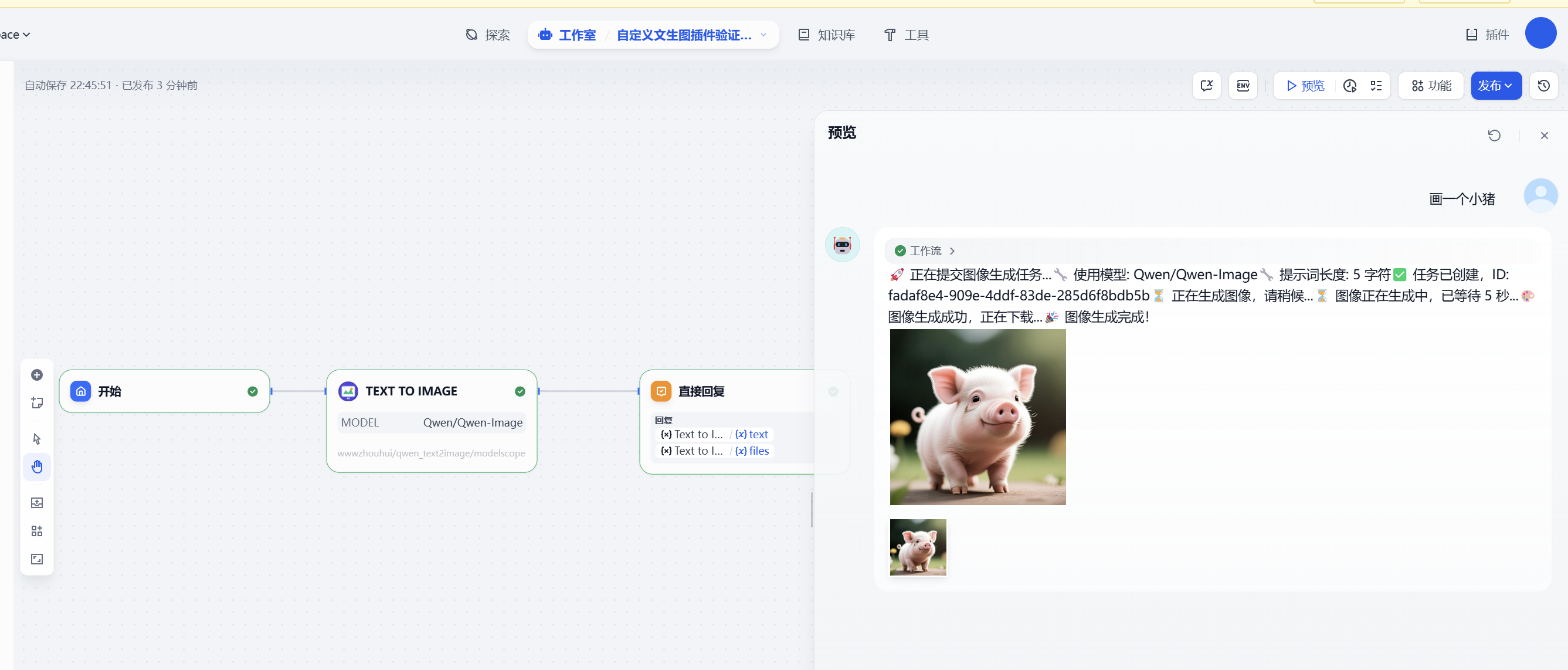
Input image description prompt
-
Select model (default: Qwen-Image)
-
Run the tool to generate image
Workflow DSL example:
app:
  description: ''
  icon: 🤖
  icon_background: '#FFEAD5'
  mode: advanced-chat
  name: Custom Text2Image Plugin Test - Chatflow
  use_icon_as_answer_icon: false
dependencies:
- current_identifier: null
  type: package
  value:
    plugin_unique_identifier: wwwzhouhui/qwen_text2image:0.0.1@18eb2a22be7173a6bd806402b1748b3d7e9967acd87e1b4c5a6b794fa08fca0c
kind: app
version: 0.3.0
workflow:
  conversation_variables: []
  environment_variables: []
  features:
    file_upload:
      enabled: false
    opening_statement: ''
    retriever_resource:
      enabled: true
    sensitive_word_avoidance:
      enabled: false
    speech_to_text:
      enabled: false
    suggested_questions: []
    suggested_questions_after_answer:
      enabled: false
    text_to_speech:
      enabled: false
  graph:
    edges:
    - data:
        isInIteration: false
        isInLoop: false
        sourceType: start
        targetType: tool
      id: 1755656337314-source-1755657278812-target
      source: '1755656337314'
      sourceHandle: source
      target: '1755657278812'
      targetHandle: target
      type: custom
      zIndex: 0
    - data:
        isInLoop: false
        sourceType: tool
        targetType: answer
      id: 1755657278812-source-answer-target
      source: '1755657278812'
      sourceHandle: source
      target: answer
      targetHandle: target
      type: custom
      zIndex: 0
    nodes:
    - data:
        desc: ''
        selected: false
        title: Start
        type: start
        variables: []
      height: 53
      id: '1755656337314'
      position:
        x: 80
        y: 282
      positionAbsolute:
        x: 80
        y: 282
      selected: false
      sourcePosition: right
      targetPosition: left
      type: custom
      width: 244
    - data:
        answer: '{{#1755657278812.text#}}

          {{#1755657278812.files#}}

          '
        desc: ''
        selected: false
        title: Direct Reply
        type: answer
        variables: []
      height: 123
      id: answer
      position:
        x: 740
        y: 282
      positionAbsolute:
        x: 740
        y: 282
      selected: true
      sourcePosition: right
      targetPosition: left
      type: custom
      width: 244
    - data:
        desc: ''
        is_team_authorization: true
        output_schema: null
        paramSchemas:
        - auto_generate: null
          default: null
          form: llm
          human_description:
            en_US: The text prompt to generate image from. Describe what you want
              to see in the image in detail. For example "A golden cat sitting on
              a red sofa in a cozy living room".
          label:
            en_US: Prompt
          llm_description: Text prompt that describes the desired image content in
            detail. The more specific and descriptive, the better the generated image
            quality.
          max: null
          min: null
          name: prompt
          options: []
          placeholder: null
          precision: null
          required: true
          scope: null
          template: null
          type: string
        - auto_generate: null
          default: Qwen/Qwen-Image
          form: form
          human_description:
            en_US: The AI model to use for image generation. Qwen-Image is the default
              and recommended model.
          label:
            en_US: Model
          llm_description: ''
          max: null
          min: null
          name: model
          options:
          - icon: ''
            label:
              en_US: Qwen-Image (Recommended)
            value: Qwen/Qwen-Image
          placeholder: null
          precision: null
          required: false
          scope: null
          template: null
          type: select
        params:
          model: ''
          prompt: ''
        provider_id: wwwzhouhui/qwen_text2image/modelscope
        provider_name: wwwzhouhui/qwen_text2image/modelscope
        provider_type: builtin
        selected: false
        title: Text to Image
        tool_configurations:
          model:
            type: constant
            value: Qwen/Qwen-Image
        tool_description: Generate high-quality images from text prompts using ModelScope
          Qwen-Image AI model. Support various image styles and detailed descriptions.
        tool_label: Text to Image
        tool_name: text2image
        tool_parameters:
          prompt:
            type: mixed
            value: '{{#sys.query#}}'
        type: tool
        version: '2'
      height: 121
      id: '1755657278812'
      position:
        x: 384
        y: 282
      positionAbsolute:
        x: 384
        y: 282
      selected: false
      sourcePosition: right
      targetPosition: left
      type: custom
      width: 244
    viewport:
      x: 34
      y: 87.5
      zoom: 1
Prompt Suggestions
For best image generation results, we recommend:
- Detailed Description: Provide specific information about scene, objects, colors, styles, etc.
- Clear Expression: Use concise and clear language for description
- Style Specification: You can specify artistic styles like "oil painting style", "cartoon style", etc.
Example prompt:
A golden cat sitting on a red sofa in a cozy living room, with warm sunlight streaming through the window, creating a cozy home atmosphere
⚙️ Technical Implementation
Core Workflow
- Task Submission: Submit asynchronous image generation task to ModelScope API
- Status Polling: Query task status every 5 seconds, wait up to 5 minutes
- Image Download: Download generated image after task completion
- Format Conversion: Use PIL to convert image to PNG format and return
API Call Pattern
# 1. Submit task
POST /v1/images/generations
Headers: X-ModelScope-Async-Mode: true

# 2. Query status
GET /v1/tasks/{task_id}
Headers: X-ModelScope-Task-Type: image_generation

# 3. Download image
GET {image_url}
🔍 Troubleshooting
Common Issues
-
Invalid API Key
- Check if API Key format starts with
ms-
- Confirm API Key is valid and not expired
-
Generation Timeout
- Check if network connection is normal
- Try simplifying prompt description
- Retry later
-
Image Download Failed
- Check network connection
- Confirm firewall settings allow access to ModelScope domains
Error Codes
401: Invalid or unauthorized API Key429: API call rate limit exceeded500: Internal server error
📋 Development Standards
This plugin strictly follows the Dify text-to-image plugin development standards defined in CLAUDE2.md:
- ✅ Asynchronous task processing mode
- ✅ Complete error handling mechanism
- ✅ Real-time progress feedback
- ✅ Bilingual support (English/Chinese)
- ✅ Standard ModelScope API calls
🤝 Contributing
Welcome to submit Issues and Pull Requests to improve this plugin!
📄 License
This project is licensed under the MIT License.
🔗 Related Links
📦 Release Notes
0.0.4
- Fixed Image2Image Functionality: Resolved issue where ModelScope server couldn't access Dify internal image URLs causing task failures
- Added Temporary Image Hosting: Integrated litterbox.catbox.moe temporary image hosting service to automatically upload images and obtain publicly accessible URLs
- Improved Image Processing:
- Automatically handles RGBA, LA, P and other color modes, converting to RGB format
- Supports image URLs from various sources (including Dify internal addresses, intranet addresses, etc.)
- Increased Network Timeout:
- API submission request timeout: 300 seconds
- Task status polling timeout: 120 seconds
- Image hosting upload timeout: 120 seconds
- Updated Default Model: Image2Image default model updated to
Qwen/Qwen-Image-Edit-2511
- Improved Error Handling: Optimized error message extraction logic, providing more detailed debugging information
0.0.3
- Enhanced Custom Image Size Support: Both Text2Image and Image2Image tools now support flexible custom image dimensions
- Automatic Size Detection: Image2Image tool automatically detects and uses input image dimensions as default size
- Improved Size Validation: Added comprehensive size format validation with user-friendly error messages
- Better Error Handling: Enhanced error messages for invalid size parameters with automatic fallback
- Code Optimization: Improved parameter handling and validation logic in both tools
- Updated Documentation: Enhanced README with detailed size configuration examples and usage guidelines
0.0.2
- Added Image-to-Image tool (Image2Image) based on ModelScope Qwen-Image-Edit
- New files:
tools/image2image.py, tools/image2image.yaml
- Registered the tool in
provider/modelscope.yaml and imported in provider/modelscope_provider.py
- Updated
manifest.yaml description and labels to reflect both text-to-image and image-to-image
- Updated README docs (EN/ZH)
- Backward compatible; no breaking changes; existing Text2Image workflows are unaffected
- Usage: In Dify, choose the "Image to Image" tool, then provide a prompt and a public image URL
0.0.1
- Initial release with Text2Image tool based on ModelScope Qwen-Image