Redmine · emploidai Marketplace
emploidai Marketplace
Add-onsAppletsPlugins
Search tools, teams, and capabilitiesPublish
MarketplacePluginsRedmine
Plugin
Limited listing

Redmine

by yasu89 · v0.1.0

Redmine plugin for Dify

659 installsUpdated Jun 28, 2025
Documentation
Publisher information is incomplete

This community listing does not yet include every recommended support, privacy, pricing, and permission disclosure. Review the available package permissions before installing.

Capabilities

Tools

Available inside your emploidai workspace after installation.

Data sources

Available inside your emploidai workspace after installation.
Category

tool

Version

0.1.0yasu89

Requirements

Maximum memory 256MB

Pricing

Not disclosed by publisher

Security & access

Review before installing

CompatibleRequires emploidai 1.0.0+

Permissions

  • Requires encrypted tool credentials

Dependencies

No additional dependencies

Resources

DocumentationPrivacy policy
emploidai Marketplace

Discover capabilities. Review access. Install inside your workspace.

DocumentationSecuritySupportPrivacyTerms

Redmine Plugin for Dify

Author: yasu89 Version: 0.1.0 Type: Tool Provider Plugin Repository: https://github.com/yasu89/redmine-dify-plugin

Description

The Redmine Plugin for Dify provides comprehensive integration with Redmine project management systems.

Tools

OUTPUT VARIABLES

All tools provide consistent output in multiple formats:

  1. Text Output: Complete raw API response data from Redmine in text format
  2. JSON Output: Complete raw API response data from Redmine in JSON format
  3. File Output: Attachment files when applicable (available with get_issues/get_issue when attachments are included)

🎯 Issue Management

  • Get Issues (get_issues): Retrieve and filter multiple issues with advanced search capabilities
    • Special Feature: Automatically downloads attachment files when attachments is specified in the Include Additional Data parameter
  • Get Issue (get_issue): Fetch detailed information about a specific issue, including attachments
    • Special Feature: Automatically downloads attachment files when attachments is specified in the Include Additional Data parameter
  • Create Issue (create_issue): Create new issues with comprehensive parameter support
  • Update Issue (update_issue): Modify existing issues with comprehensive field updates

👥 User Management

  • Get Users (get_users): List and filter users (requires admin privileges)
  • Get User (get_user): Retrieve detailed information about a specific user, including support for the current user
  • Create User (create_user): Create new users with password management options (requires admin privileges)
  • Update User (update_user): Update user information and manage admin privileges (requires admin privileges)

Setup Instructions

1. Enable REST API in Redmine

  1. Log into your Redmine instance as an administrator
  2. Go to Administration → Settings → API
  3. Check Enable REST API
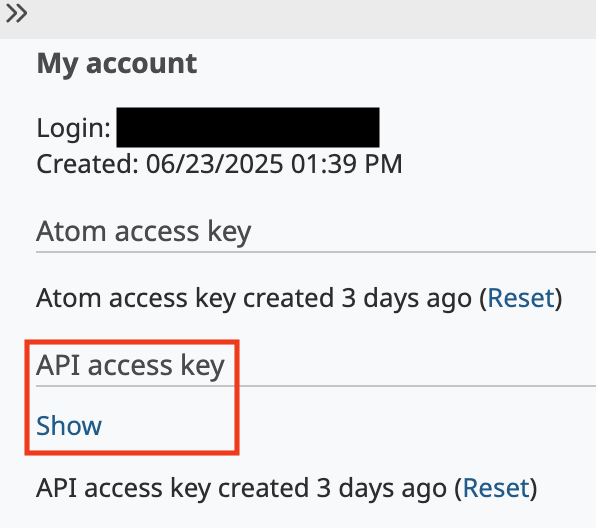
  4. Go to your account page (/my/account)
  5. Get your API key on the right-hand pane of the default layout

See also: https://www.redmine.org/projects/redmine/wiki/rest_api#Authentication

api_key

2. Configure the Plugin in Dify

  1. Select the Redmine plugin
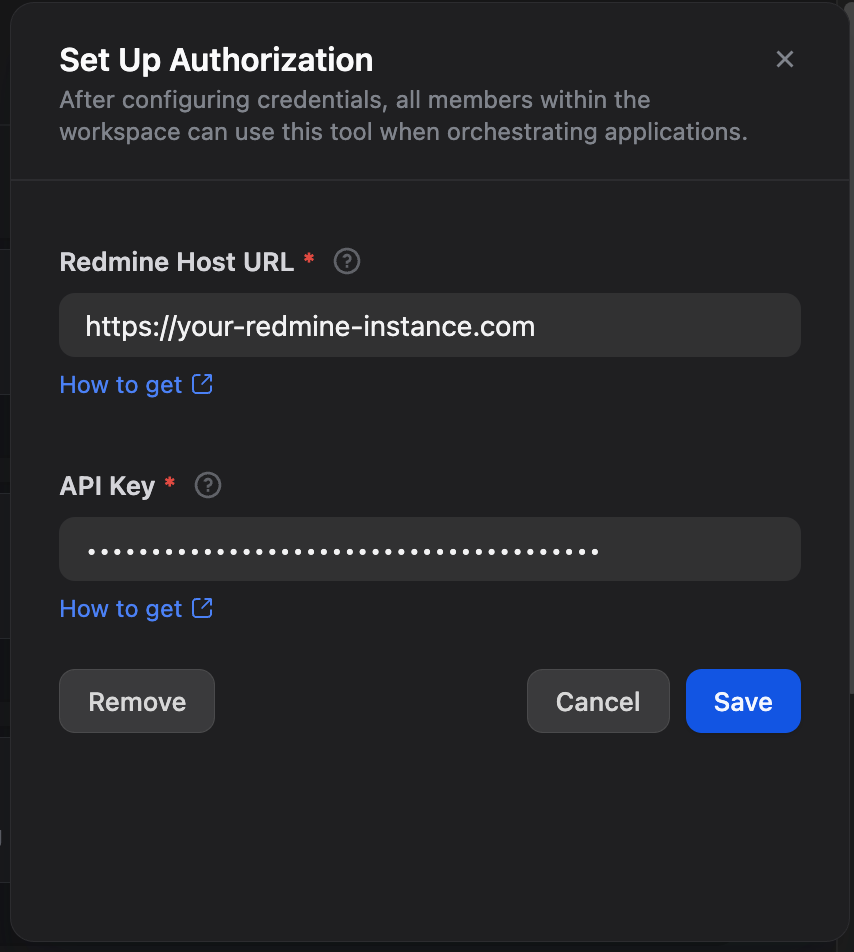
  2. Setup Authorization
    • Redmine Host URL: Enter the URL of your Redmine instance
    • API Key: Enter your Redmine API key from the previous step
  3. Click Save button

setup

API Compliance

This plugin is fully compliant with the official Redmine REST API:

  • Redmine REST API Documentation
  • Issues API
  • Users API

Privacy Policy

See Privacy Policy

License

MIT License